Kill SSH on ECS: Session Manager and ECS Exec with Terraform
Get a shell into your ECS hosts and a Rails console inside your containers without opening a single inbound port, handing out SSH keys, or losing the audit trail.
Also available in Português (Brasil)
Most ECS-on-EC2 setups I've seen still carry some SSH legacy: a key pair in the launch template, port 22 open to a bastion, and nobody quite sure who still has the private key.
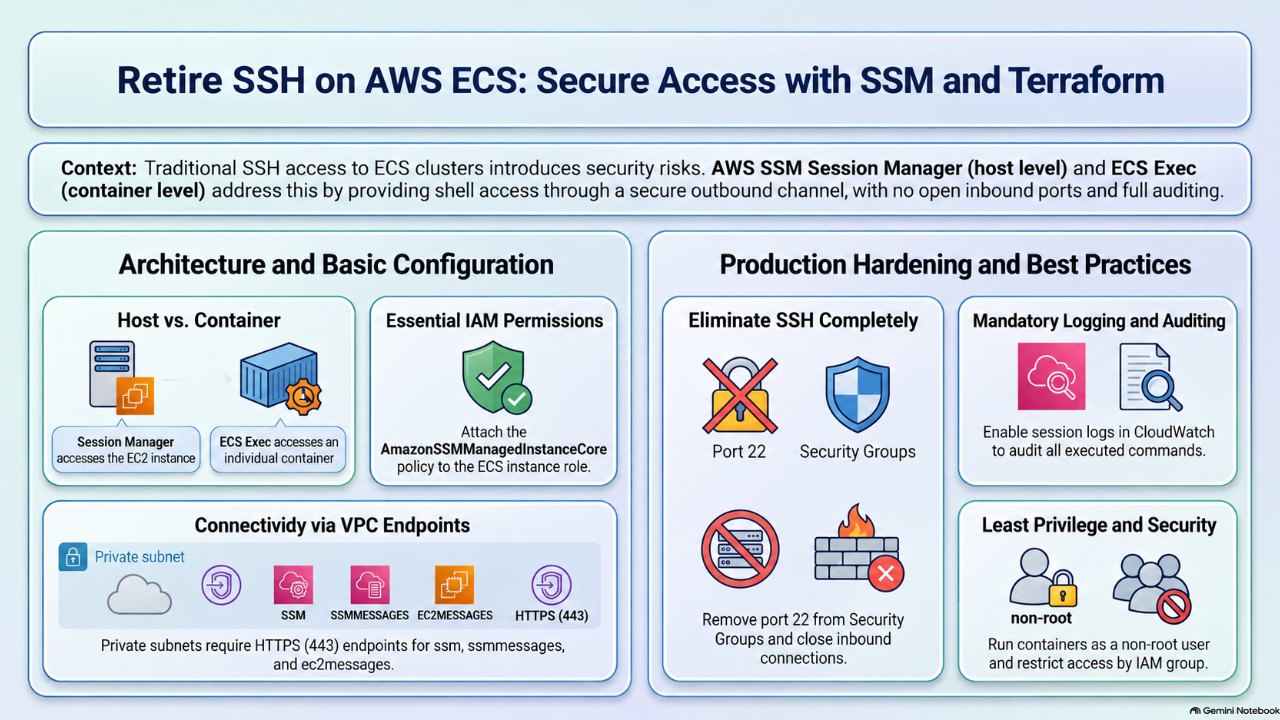
AWS Systems Manager (SSM) Session Manager replaces all of that with IAM-controlled, logged sessions over an outbound-only channel. ECS Exec builds on the same plumbing to give you a shell inside a running container, which is what you actually want when you need a rails console in staging.
This post walks through enabling both with Terraform, including the gotchas I hit along the way. All names, IDs and regions below are placeholders.
Two different things, same plumbing
- Session Manager on the host: shell into the EC2 container instance. Requires the SSM Agent on the host and permissions on the instance role.
- ECS Exec: shell into a specific container of a running task. Requires permissions on the task role,
enable_execute_commandon the service, and (optionally) logging configured on the cluster.
Both need outbound HTTPS to the SSM endpoints. You can enable either one independently.
Prerequisites
- ECS container instances running the ECS-optimized Amazon Linux 2023 (or AL2) AMI. The SSM Agent ships preinstalled and enabled.
- Outbound 443 from instances and tasks to
ssm,ssmmessagesandec2messages, via NAT or VPC interface endpoints. - AWS CLI v2 and the Session Manager plugin on your workstation.
Step 1: Grant SSM to the container instance role
One managed policy is enough for the agent to register:
resource "aws_iam_role_policy_attachment" "ecs_instance_ssm" {
  role       = aws_iam_role.ecs_instance.name
  policy_arn = "arn:aws:iam::aws:policy/AmazonSSMManagedInstanceCore"
}
If your instance roles are created inside a module per capacity group (high-memory, general purpose, and so on), put the attachment inside the module so every group gets it.
Also check whether the role uses managed_policy_arns or aws_iam_role_policy_attachments_exclusive. If it does, add the ARN to that list instead, or the two will fight on every apply.
No reboot is needed. The agent retries registration on its own and usually shows up within a few minutes.
Step 2: Private subnets need VPC endpoints
If your instances or tasks have no NAT, add interface endpoints:
locals {
  ssm_services = ["ssm", "ssmmessages", "ec2messages"]
}

resource "aws_vpc_endpoint" "ssm" {
  for_each            = toset(local.ssm_services)
  vpc_id              = var.vpc_id
  service_name        = "com.amazonaws.${var.region}.${each.key}"
  vpc_endpoint_type   = "Interface"
  subnet_ids          = var.private_subnet_ids
  security_group_ids  = [aws_security_group.vpce.id]
  private_dns_enabled = true
}
The endpoint security group must allow 443 inbound from your instance and task security groups. If you log sessions to CloudWatch or encrypt with KMS, add logs and kms endpoints too.
Step 3: Task role permissions for ECS Exec
The SSM agent inside the container uses the task role, not the instance role:
data "aws_iam_policy_document" "ecs_exec" {
  statement {
    actions = [
      "ssmmessages:CreateControlChannel",
      "ssmmessages:CreateDataChannel",
      "ssmmessages:OpenControlChannel",
      "ssmmessages:OpenDataChannel",
    ]
    resources = ["*"]
  }

  statement {
    actions = [
      "logs:DescribeLogGroups",
      "logs:CreateLogStream",
      "logs:DescribeLogStreams",
      "logs:PutLogEvents",
    ]
    resources = ["*"]
  }
}

resource "aws_iam_role_policy" "ecs_exec" {
  name   = "ecs-exec"
  role   = aws_iam_role.task.id
  policy = data.aws_iam_policy_document.ecs_exec.json
}
In real life, scope the logs statement to your exec log group ARN. If the log group is KMS-encrypted, add kms:Decrypt on that key.
Step 4: Cluster logging and the service flag
resource "aws_cloudwatch_log_group" "ecs_exec" {
  name              = "ecs-execute-command-${var.environment}"
  retention_in_days = 90
}

resource "aws_ecs_cluster" "this" {
  name = var.cluster_name

  configuration {
    execute_command_configuration {
      logging = "OVERRIDE"

      log_configuration {
        cloud_watch_log_group_name = aws_cloudwatch_log_group.ecs_exec.name
      }
    }
  }
}

resource "aws_ecs_service" "console" {
  name                   = "rails-console-${var.environment}"
  cluster                = aws_ecs_cluster.this.id
  task_definition        = aws_ecs_task_definition.console.arn
  enable_execute_command = true
  # ...
}
Important:
enable_execute_commandonly applies to tasks started after the change. Existing tasks keep running without it. Force a new deployment once the apply lands.
Step 5: Human access
Attach this to an IAM group (for example staging-operators), not to individual users:
{
  "Version": "2012-10-17",
  "Statement": [
    {
      "Effect": "Allow",
      "Action": ["ecs:ExecuteCommand", "ecs:DescribeTasks", "ecs:ListTasks"],
      "Resource": [
        "arn:aws:ecs:<REGION>:<ACCOUNT_ID>:cluster/staging",
        "arn:aws:ecs:<REGION>:<ACCOUNT_ID>:task/staging/*"
      ]
    },
    {
      "Effect": "Allow",
      "Action": "ssm:StartSession",
      "Resource": [
        "arn:aws:ec2:<REGION>:<ACCOUNT_ID>:instance/*",
        "arn:aws:ssm:<REGION>:<ACCOUNT_ID>:document/SSM-SessionManagerRunShell"
      ],
      "Condition": {
        "StringEquals": { "ssm:resourceTag/Environment": "staging" }
      }
    },
    {
      "Effect": "Allow",
      "Action": ["ssm:TerminateSession", "ssm:ResumeSession"],
      "Resource": "arn:aws:ssm:*:<ACCOUNT_ID>:session/${aws:username}-*"
    }
  ]
}
Check what you already have before adding anything:
aws iam simulate-principal-policy \
  --policy-source-arn arn:aws:iam::<ACCOUNT_ID>:user/<YOUR_USER> \
  --action-names ecs:ExecuteCommand ssm:StartSession \
  --query 'EvaluationResults[].[EvalActionName,EvalDecision]' --output table
Step 6: Ship it through CI, not your laptop
If your team runs Terraform only through a pipeline (it should), validate locally without touching state:
terraform fmt -recursive
terraform init -backend=false
terraform validate
Then open a merge request and read the plan carefully. You want to see only your additions. Anything else is drift from manual changes: flag it instead of applying it.
Gotcha: "log group already exists"
If someone previously enabled exec logging in the console, the apply fails with ResourceAlreadyExistsException. Don't delete the group. Import it with an import block (Terraform 1.5+) so the pipeline adopts it:
import {
  to = aws_cloudwatch_log_group.ecs_exec
  id = "ecs-execute-command-staging"
}
Expect 1 to import, 0 to add, 0 to change. Remove the block in a follow-up MR. Note that import blocks apply to every workspace using the root module, so check your other environments first.
Step 7: Connect
Install the client side on macOS:
brew install awscli
brew install --cask session-manager-plugin
Confirm hosts are registered:
aws ssm describe-instance-information \
  --query 'InstanceInformationList[].[InstanceId,PingStatus,AgentVersion]' \
  --output table
Shell into a host:
aws ssm start-session --target <INSTANCE_ID>
Shell into a container (hello, rails console):
TASK=$(aws ecs list-tasks --cluster staging \
  --service-name rails-console-staging \
  --query 'taskArns[0]' --output text)

aws ecs execute-command --cluster staging --task "$TASK" \
  --container rails-console-staging --interactive \
  --command "/bin/bash"
Troubleshooting
| Error | Likely cause |
|---|---|
execute command was not enabled when the task was run | Task predates enable_execute_command. Force a new deployment. |
TargetNotConnectedException | Task role missing ssmmessages:*, broken exec logging config (missing log group or log permissions), no route to ssmmessages, or an old task. Run AWS's amazon-ecs-exec-checker script. |
Instance missing from describe-instance-information | Instance role lacks AmazonSSMManagedInstanceCore, or no network path. Check /var/log/amazon/ssm/amazon-ssm-agent.log. |
InvalidInstanceId regex error when filtering by IDs | CLI text output separates IDs with tabs, and zsh doesn't word-split. Normalize with tr -s '[:space:]' ','. |
SessionManagerPlugin is not found | Plugin not on PATH. Reinstall or open a new shell. |
| Resources exist but the CLI can't see them | Wrong region. Check AWS_REGION and your profile. |
Before you roll this to production
- Turn on session logging and verify the streams actually land. Production shell access must be auditable.
- Separate IAM group for production, ideally behind SSO with MFA.
- Restrict exec by container name with the
ecs:container-namecondition, so access is limited to console containers. - Run containers as a non-root
USER. ECS Exec lands you as whatever user the container runs as. - Block containers from the host's IMDS credentials (awsvpc IMDS blocking or hop limit 1), so tasks can't piggyback on the instance role's SSM permissions.
- Remove port 22 from security groups and the key pair from the launch template. That's the payoff.
- Keep the SSM Agent current: an
AWS-UpdateSSMAgentState Manager association, or regular AMI refreshes.
Wrap-up
The whole change is a handful of IAM statements, three VPC endpoints, one cluster block and a service flag. The time sinks are elsewhere: tasks that predate the flag, log groups created by hand, and shell quirks. Codify it once in a module, roll it through CI, and you'll never hand out an SSH key again.
Comments
Sign in with GitHub to comment.
No comments yet.