Your SPA Shares as a Blank Card: Fixing Link Previews with a Lambda in Front of Amplify
Link preview crawlers don't run JavaScript, so every route of a static SPA shares the same generic card. Here's how a Lambda in front of AWS Amplify injects per-page Open Graph tags, the six bugs that kept it from working, and the lean version that does.
Also available in Português (Brasil)
Most of what I write here is about Rails, but this week's lesson came from the other side of the stack: a Next.js and Vite single-page app, statically built, served by AWS Amplify behind CloudFront. The product team had one request that sounded trivial. When a user shares a trip link in WhatsApp, Facebook or LinkedIn, the preview should show the trip's name, a useful description and a wide map image. Instead, every link showed the same generic card: the app name, the tagline and a tiny square logo.
The team had already built the standard fix, a Lambda function that injects Open Graph tags into the page. It still didn't work. This post walks through why static apps have this problem, how the Lambda approach works, the six bugs that kept it from working, and the lean version that does.
Why static apps share badly
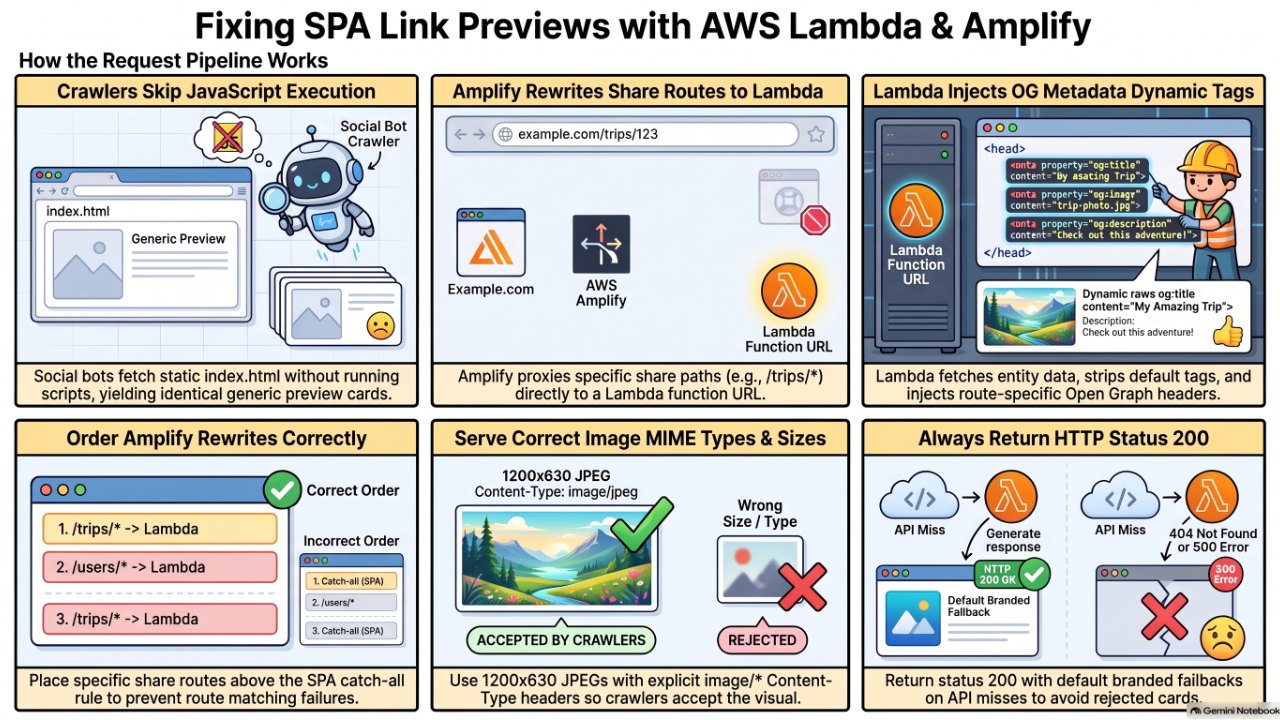
Link preview crawlers (facebookexternalhit, WhatsApp, LinkedInBot, Slack, Telegram, iMessage) fetch your URL once, read the <head>, and leave. They do not run JavaScript. That is the whole problem.
In a statically exported SPA, every route serves the same index.html. The trip page at /trips/a1b2c3 only becomes a trip page after React boots in the browser and calls your API. The crawler never sees that. It sees the default <title> and whatever og:* tags you baked into the build, so every link looks the same.
In Rails this problem barely exists. The server renders the page, so you set the tags in the layout per request and you're done:
<% content_for :head do %>
  <meta property="og:title" content="<%= @trip.share_title %>" />
  <meta property="og:image" content="<%= trip_og_image_url(@trip) %>" />
<% end %>
A static SPA has no server in the request path, so you have to put one back, at least for the routes people share.
The architecture: a function in front of the shell
The pattern is simple:
- Amplify receives
GET /trips/a1b2c3. - A rewrite rule (status 200, so the URL doesn't change) proxies that path to a Lambda function URL.
- The Lambda fetches the trip from the API and fetches the app's
index.html. - It removes the default title and OG tags from the shell, injects the trip-specific ones at the top of
<head>, and returns the page. - Crawlers read the head and build the card. People get the normal app, which boots and renders the trip as usual.
The body is never touched. The function only rewrites the head, so the app behaves exactly as before for humans. That is the main advantage over prerendering every page: you only do server work for the routes people share, and the app stays a plain static build.
Six bugs that broke the previews
The original function looked complete. It had tag generation, environment fallbacks, caching and even a styled preview page. Every preview still came out generic. Here is what was wrong, roughly in order of impact.
1. The rewrite never reached the function
Amplify evaluates rewrite rules top to bottom and stops at the first match. The SPA catch-all (the regex that sends every extensionless path to /index.html) was listed above the /trips/<*> rule, so crawlers got the static shell with its default tags. The function was only reached in some environments, which made it look intermittent.
The second rewrite trap is the target path. If the target is https://<fn-url>/<*>, the function receives /a1b2c3 instead of /trips/a1b2c3, and the route matching fails silently. Keep the prefix in the target, and keep the share routes above the catch-all:
[
  { "source": "/trips/<*>", "target": "https://<fn-id>.lambda-url.us-east-1.on.aws/trips/<*>", "status": "200" },
  { "source": "<SPA catch-all regex>", "target": "/index.html", "status": "200" }
]
2. API failures were invisible
The API helper returned null on any non-2xx response, without logging it. A 401 from a missing header, a 404 from the wrong endpoint and a 2.5-second timeout all produced the same generic card, and the logs said only found: false. One line of logging turned an afternoon of guessing into a five-minute fix:
if (!res.ok) {
  console.warn(JSON.stringify({ msg: "api miss", url, status: res.status }));
  return null;
}
The same helper also assumed a flat payload, while the API returned JSON:API (data.attributes.*). Every field read as undefined, which produced cards that said "A trip on the app" with no details. Flatten the response before you build anything from it.
3. The image had an invalid Content-Type
This was the subtle one. The trip map was served by an image-resize service that answered with Content-Type: image, a type with no subtype. Browsers shrug and render it. Facebook and LinkedIn validate the image response and reject it, so the card falls back to text only.
The function declared og:image:type: image/png, which didn't help. That tag is a hint. Scrapers trust the response headers of the image itself.
The fix: serve the image through the same function, at /trips/:token/og.png, and set the real type by reading the file's magic bytes. As a bonus, the image now lives on your own domain.
function sniffType(b) {
  if (b[0] === 0x89 && b.toString("ascii", 1, 4) === "PNG") return "image/png";
  if (b[0] === 0xff && b[1] === 0xd8 && b[2] === 0xff) return "image/jpeg";
  if (b.toString("ascii", 0, 4) === "RIFF" && b.toString("ascii", 8, 12) === "WEBP") return "image/webp";
  return null;
}
Lambda function URLs return binary content as base64 with isBase64Encoded: true. The proper long-term fix is still to store the files with the right metadata at the source; the relay just stops you from waiting on that.
4. The fallback was a square logo
Whenever a lookup failed, the card used a 512x512 app icon. Every platform renders a square image as a small thumbnail next to the text, which is why the previews never looked "landscape" even when the tags were technically present. Use a 1200x630 branded JPEG for the fallback, and declare og:image:width and og:image:height so Facebook doesn't skip the image on the first share.
5. Duplicate tags
The function emitted <link rel="canonical"> twice, and the Vite build shipped its own default og:title and description. With two of a tag on the page, some parsers read the first and some read the last. Strip everything you own from the shell (title, description, canonical, every og:* and twitter:* tag) before injecting your own.
Also use a function as the replacement in String.replace. A trip named Me $& my crew otherwise gets mangled, because $& is a replacement pattern:
html.replace(charsetTag, () => `${charsetTag}\n${head}`);
6. Time: dates shifted and timeouts stacked
Two time bugs, both classic. First, new Date("2026-07-16") is UTC midnight, so formatting it in a US time zone printed the day before. A date-only value is a calendar date; format it in UTC. Rails developers know this one as the difference between Date and Time, and JavaScript makes it easy to forget.
Second, the function looked up the trip in the "own" environment first and only then tried the others, so a miss cost two full timeouts, about five seconds. WhatsApp gives up well before that. Query all environments in parallel and take the first hit in priority order:
async function resolve(kind, key, envs) {
  const results = await Promise.all(envs.map((e) => apiGet(e.api, ENDPOINTS[kind] + encodeURIComponent(key))));
  const i = results.findIndex(Boolean);
  return i >= 0 ? { env: envs[i], data: results[i] } : { env: envs[0], data: null };
}
The lean version
After fixing the bugs, I cut the function from about 700 lines to about 400. Most of the removed code wasn't wrong, it just didn't change any preview:
- The standalone preview page. The original rendered a styled card in the body and served the real app only behind a
?view=applink. Crawlers never look at the body, so everyone now gets the real app with the right head, one hop instead of two. - Duplicate Twitter tags. X falls back to
og:title,og:descriptionandog:image. You only needtwitter:cardset tosummary_large_image. - Tags no scraper relies on, like
og:image:type,og:image:secure_urlandauthor. - Extra stats in the description, which pushed it past the roughly 300 characters platforms display.
The core of the handler is short:
export const handler = async (event) => {
  const [, kind, key, isImage] = (event.rawPath || "").match(ROUTE) ?? [];
  const envs = envOrder(event.headers);
  if (isImage) return serveImage(kind, key, envs);

  const shellFirst = getShell(envs[0]);   // fetch the shell while the API answers
  const { env, data } = await resolve(kind, key, envs);
  const url = `${env.public}/${kind}/${key}`;
  const card = data && buildCard(kind, data, url);
  const tags = card || { title: "App", description: "Default tagline", url, image: null };
  const shell = env === envs[0] ? await shellFirst : await getShell(env);

  return {
    statusCode: 200,                      // Facebook rejects non-200 pages outright
    headers: {
      "Content-Type": "text/html; charset=utf-8",
      "Cache-Control": card ? "public, max-age=60, stale-while-revalidate=300" : "no-store",
    },
    body: inject(shell, headTags(tags, env)),
  };
};
A few details matter more than they look:
- Always return 200, even for an unknown trip. A 404 gets you no card at all; a generic branded card is better. Mark misses
no-storeso a CDN doesn't pin the generic card to a valid URL. - Inject at the top of the head, right after
<meta charset>. WhatsApp parses roughly the first 300 KB of the page, and Vite can stack a lot ofmodulepreloadlinks before your tags. - Rewrite root-relative asset paths in the shell to your public domain, so the page works on any environment's domain and module scripts stay same-origin.
- Cache the shell in memory for a few minutes, and keep the stale copy if a refresh fails. A stale shell beats a broken app.
Know what each platform actually shows
"Rich description" means different things per platform, and it changes what you should optimize:
- LinkedIn shows the image, the title and the domain. No description.
- Facebook often truncates or drops the description, depending on the layout.
- WhatsApp, Slack and Telegram show the description, and WhatsApp skips images larger than about 300 KB.
So put the key fact in the title. "Annapolis to St. Michaels · 23 nm" works on every platform. "Saturday run" works on none of them. Keep the image wide (about 1.91:1, at least 600 px wide for the large card) and prefer JPEG to keep it small.
Testing without guessing
Fake the crawler with curl and check both the page and the image it points to:
URL=https://app.example.com/trips/a1b2c3
for ua in "facebookexternalhit/1.1" "WhatsApp/2.24.0 A" "LinkedInBot/1.0"; do
  echo "== $ua"
  curl -s -A "$ua" "$URL" | grep -oE 'og:(title|description|image)" content="[^"]*'
done
curl -sI https://app.example.com/trips/a1b2c3/og.png | grep -iE 'content-(type|length)'
Then re-scrape with the Facebook Sharing Debugger and the LinkedIn Post Inspector. Both cache aggressively, and so does WhatsApp, which caches per URL on the sender's phone. Add ?v=2 to test a fresh preview. Finally, log the user agent and whether the card was found on every request. When a preview breaks in production, that one log line tells you which half of the system to look at.
When not to do this
If your Next.js app can run server-side, skip the Lambda. generateMetadata in app/trips/[token]/page.tsx does all of this natively, per request, with no rewrite rules or HTML surgery. The Lambda pattern earns its keep when the app is a static export or a Vite SPA and you don't want to take on a server just for previews.
And if you're on Rails, take the hint: server-rendered meta tags are one of those boring advantages you only notice when they're gone.
Checklist
- Share routes are rewritten above the SPA catch-all, and the target keeps the path prefix.
- API misses log the status code and URL.
- The payload shape matches what the card builder reads.
- The image response has a real
image/*Content-Type, is wide and stays under about 300 KB. - The fallback image is 1200x630, not a square logo.
- Exactly one title, description, canonical and set of
og:*tags per page. - Date-only values are formatted in UTC.
- Environment lookups run in parallel, within one timeout.
- The page always returns 200, and misses are not cached.
- The title carries the key fact, because LinkedIn shows nothing else.
Comments
Sign in with GitHub to comment.
No comments yet.